
To create articles in WordPress SEO standards and communicate information well to users or Google (search engines) then first you need to know basics of Classic or Block default editor (Gutenberg).
In particular, the classic editor will be similar to Word software so it is easy to use and friendly to everyone. However, its customization is quite limited unlike Gutenberg.
Block or Gutenberg editor is built into the platform so you do not need to install any additional plugins, so it can help the site a little lighter. In addition, it also equips many utilities for users to use when editing such as FAQ blocks, article lists, …
💡 The writing process is just the top part. To understand why each element is important, read first What is SEO and website optimization process.
The objective of this article:
- Helping You Understand How To Post Articles On WordPress
- How to write articles on WordPress vividly, SEO standards
- Checklist of SEO standard elements in an article
- Good Writing Ways for Google to Trust Articles
1. How to Create Posts in WordPress
After logging in to the website with user and password. Look at the menu along the left side of the screen.
Navigate to the Post menu, then tap Add New Post.

New article editor appears as shown
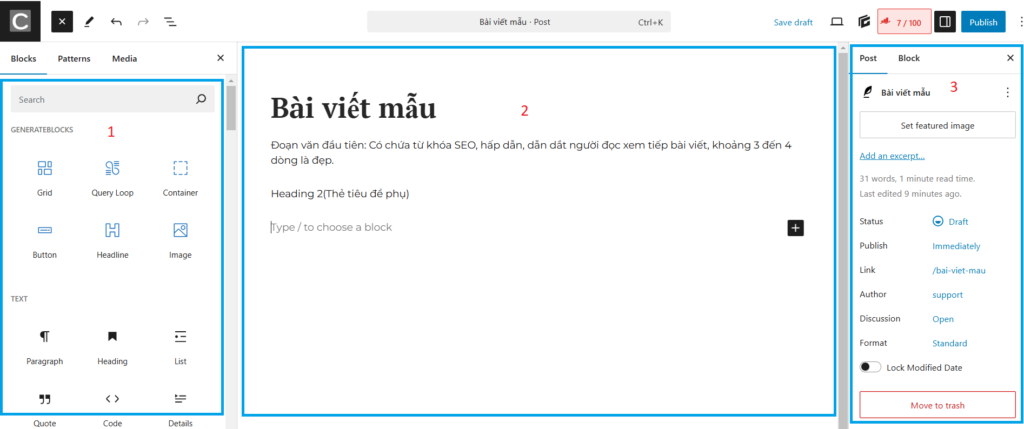
The layout consists of 3 parts:
- Part 1: Utility blocks for inserting into posts
- Part 2: Content drafting
- Part 3: Installation for the article
When working, we will have to use all three of these parts so I will introduce the appropriate operations for each Block in turn more specifically.
Part 1: Commonly used utilities

- Add title: Be the title of the article
- Type/ to choosea block: Type in the block or select the block
- Each time you finish writing a paragraph, just enter to the line
- If you want to insert a widget block, click the black (+) button
For example:

If you want to display more widgets, click “Browse all“.
In particular, the basic blocks needed and frequently used are:
- Paragraph (Paragraph): Blocks for basic text editing with formatting options such as bold, italic, alignment, links.
- Heading (Headings): Create headlines from H1 to H6 to structure the content.
- List (List): Create bulleted or numbered lists.
- Quote (Quote): Adds a quote, usually displayed with a separate formatting style.
- Code (Code): Displays simple programming code in special format.
- Image (Image): Insert images from gallery or upload from computer.
- Gallery (Photo Gallery): Create a grid with multiple images.
- Video (Video): Embed videos from library or upload from computer.
- Audio (Audio): Insert audio file into content.
- File (File): Insert download link for file.
- Buttons (Buttons): Create buttons with links.
- Table (Table): Create tables with rows and columns.
Part 2: How to Write a WordPress Post
To create an article on the website using the WordPress platform or any other platform will have to go through the same steps as follows:
- Step 1: Open the editor
- Step 2: Implement logical and seamless content structures and ideas
- Step 3: Insert illustrations to make the article more vivid
- Step 4: Check the content for proper presentation, spelling and style
- Step 5: Re-customize settings for posts and SEO optimization
- Step 6: Publish
Example: Here is a short paragraph for an example of SEO standard article on keywords [Writing SEO Standards on WordPress].

If you want to create a new Heading, press the (+) button to insert the [Heading] block.
Write subheadings (H2, H3, H4, H5)
If you want to select a sentence as a Heading, click on that line > Select Paragraph > Select Heading > Select the level of the Heading (maybe Heading 2, Heading 3, ..)

Insert Images into Posts
- To insert images, you will use the mouse placed at the end of the sentence (where the image should be inserted” and press Enter to unload.
- Press the black (+) and select the Image block. If you don’t see the [Image] block, type “image” in the search box and it will appear.

The Image block appears with 3 options:
- Upload: Up new pictures from the machine up
- Media Library: Get photos in the gallery of the website
- Insert from URL: Insert with a picture link. For example, domain.com/viet-bai.jpg, which can be a link on your website or any other website.

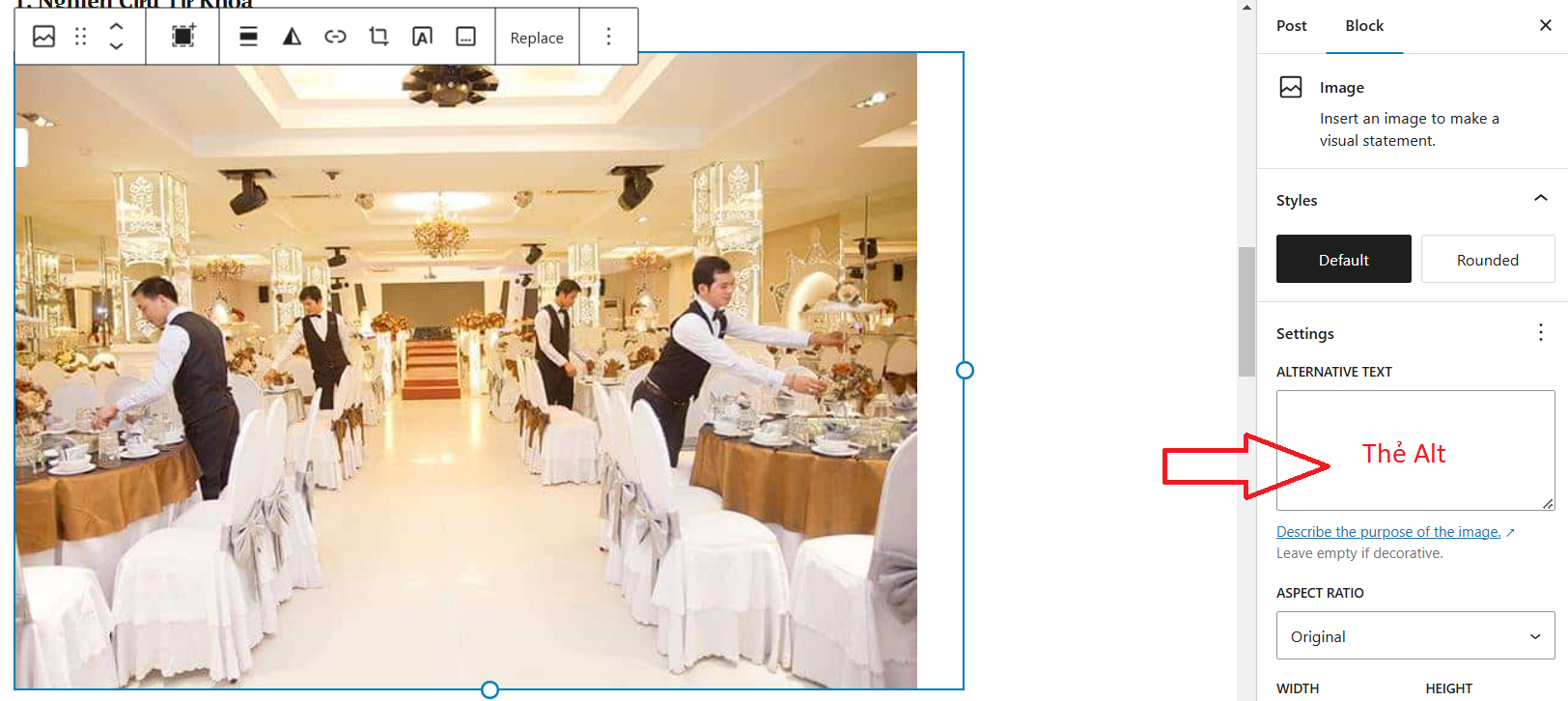
When you upload a photo, make sure to enter the ALT tag for the photo in the Setting section.
Insert Link
To insert a link, just highlight the text and then select the Link icon (Shortcut key Ctrl + K)

Settings for posts

Explain:
- Set featured image: The image represents the article.
- Add an excerpt: This is the short description that summarizes the content of the article, usually displayed on the category page or when sharing the article.
- Status (Status) included “Draft”: The article is currently in draft state, has not been published and other states like… Published: The article has been published.Pending Review: Pending review before publication.Scheduled: Scheduled for future publication.
- Publish: Publish time. Choose Immediately to publish now or set a timer for the post to self-post.
- Link: Post link
- Author (Author) Articles
- Discussion: Comment, allow comment or not
- Move to Trash: Delete Posts
SEO optimization for posts
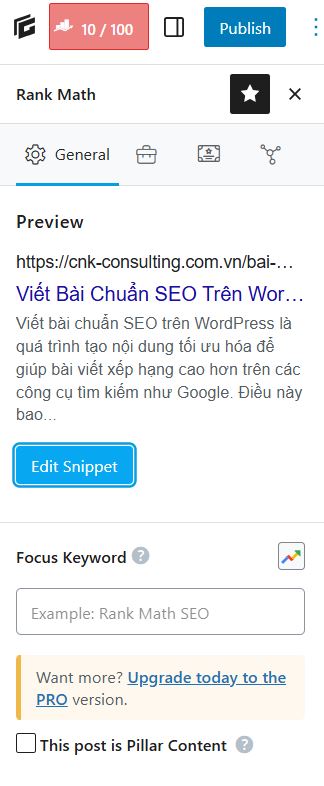
Click on the red button next to [Publish].
- Insert your main keyword into the [Focus Keyword] section.
- Click [Edit Snippet] to customize the fields required for SEO.
💡 Before posting, choose the right keyword for the post: reference SEO standard writing tools to research and optimize content.
Posts
After you have finished composing the content and optimizing it, you click [Publish” to post. ”
💡 Have a writing process already but have not reached the top as desired? Let SEO services of Duan Digi optimize the overall website for you.
