

As a Maker SEO or webmaster, you probably understand that the check when the site starts to open index Not just curiosity but an important step in valuing the history and authority of a website domain name.
So how to find out when a website was first noted by Google? Although there is no magical tool that will give you a 100% accurate answer, don’t worry. In this article, I will share 5 most effective methods to “Trace” this important time.
💡 Index is a link in the SEO process. If you are not sure how crawling – indexing – ranking works, read before What is SEO and how Google works.
How to check when the site starts to open index?
First, I need to share with you the fact that Google does not publish the first day a website is indexed.
However, there is an extremely effective way that the SEO community often uses to estimate this moment, which is to use the tool Wayback MachineThis tool is like a time machine, it saves the snapshots of the website in the past. So, the oldest record you find is the most authentic evidence that the website is up and running and ready for Googlebot to visit.
Let me guide you 3 quick steps:
- Visit Site:
archive.org - Enter domain name: Type the domain name you want to check into the search box.
- View History: Look at the year chart and click on the first year that your data is recorded.
5 Ways to Check Site Start Time On The Most Accurate Index
1. Use the Wayback Machine to see the first index opening date
As Dun shared in the quick answer, the Wayback Machine is the most effective tool for you to find visual evidence of a website’s existence.
I like to call it a time machine, because it allows you to review the look and feel of a website at different times in the past.
The first record saved on this system is an extremely reliable sign that the website has come online. Once the website is online, it will be ready for Google bots to visit and start the index process.
To use, please follow these detailed steps:
- Step 1: Access the Internet Archive: Open the browser and go to the page
archive.org. - Step 2: Enter domain name: Type the website address you want to check into the search box and press
Enter. - Step 3: Analyze timeline: You will see a chart of years. Click on the first year with black lines. A calendar of that year will appear below.
- Step 4: Find the first record: In the calendar, look for the first day circled in blue or blue. Click on it, and a snapshot of the website at that time will appear.
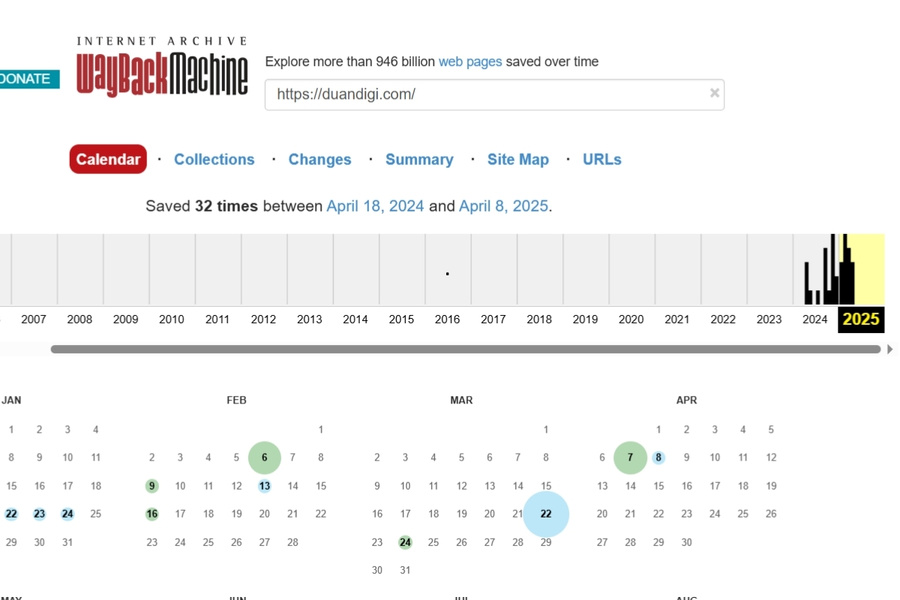
Analysis of the results:
The date you find on the Wayback Machine is not 100% Google index date, but it’s extremely close to that point.
The logic is simple: a website must be built and publicly available before Google can find and index it. So the date of this first record is the most valuable clue you have.
2. Check Date of Domain Registration
Before a website can be Google indexed, it must exist first. And the domain registration date check, also known as WHOIS check, will tell you exactly when that most primitive.
You note a very important point that is the date of domain registration NOT NOT is the date the website starts to open index.
You can imagine registering a domain name is like buying a piece of land. Building a website and letting Google know about it is like building a house and opening.
These two times can be days, months, or even years apart.
To check this information is very simple, you just need to use free tools such as:
- Who.is
- GoDaddy WHOIS
After entering the domain name, look for the line that says Creation Date or Registered OnThis is the date the domain name was first registered.

I’ll give you a real situation to help you visualize. Let’s say you check a domain name and see the registration date is 2015.
However, when using the Wayback Machine (as I shared in Part 1), you see the first website record is from 2020.
This will let you know that the domain name was inactive for five years or used for a different purpose before the current website was created.
3. Trace the preliminary index data by Google operator
Now, we’ll try a slightly more detective approach: using Google’s own search engine to trace the oldest index data. This allows you to query Google’s massive database directly, though it can sometimes take a little patience.
I will guide you the steps to implement offline:
- Step 1: Open Google Search.
- Step 2: Use the operator
site:to limit searches in the site you need to check. For example:site:vnexpress.net - Step 3: Open the filter: Under the search bar, click on Tools & Tools (Tools).
- Step 4: Customize the time: Click on the All the time (Any time) and select Customizable Range… (Custom range…).
- Step 5: Start tracing: This is the most important step. Try to search in a really old time, for example, from
01/01/2005to come31/12/2010. If no results, try closer intervals (e.g. 2011 – 2015) until you find the first results.
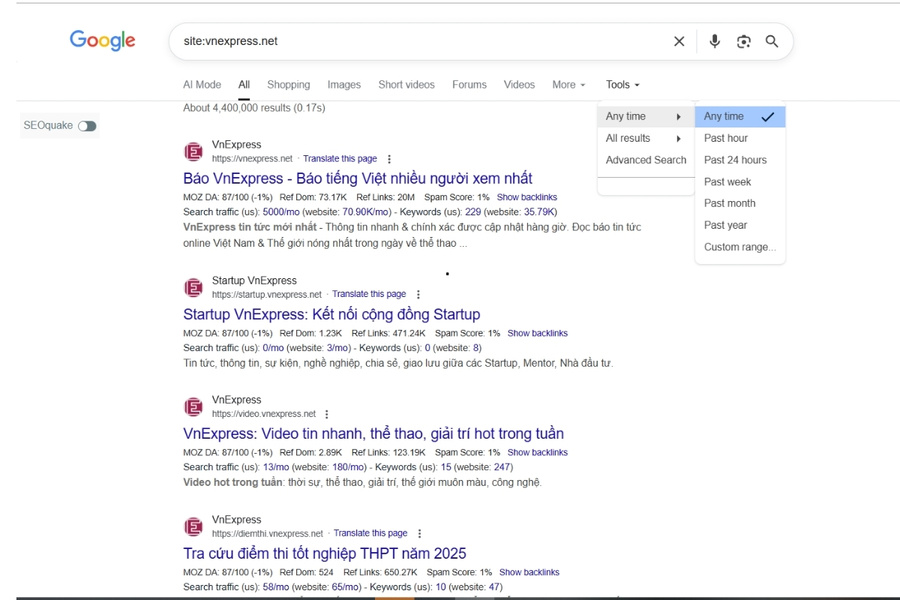
It’s important to note that this is an advanced search and won’t always yield results, as Google may no longer store older indexes. However, if you find an article that has been indexed since a very long time ago, that’s extremely authentic evidence.
4. First backlink analysis
Imagine this: a website can only be mentioned by other sites, i.e. pointing backlinks back, after it has existed and been known to Google. So finding the first backlinks is a great way to determine when the website began to attract attention and be valuable in cyberspace.
This method requires you to use professional SEO tools, as they are capable of collecting link data on a large scale. The two most popular tools are:
- Ahrefs
- SEMrush
With Ahrefs, I will guide you how to do as follows:
- Step 1: Log in to Ahrefs and enter the domain you want to check in Site Explorer.
- Step 2: In the Overview page, look at the history chart of Referring Domains (Domain name pointing to).
- Step 3: Drag the time slider on the chart to the starting point. The first time the chart starts to go up is the time when the website received the first backlinks.
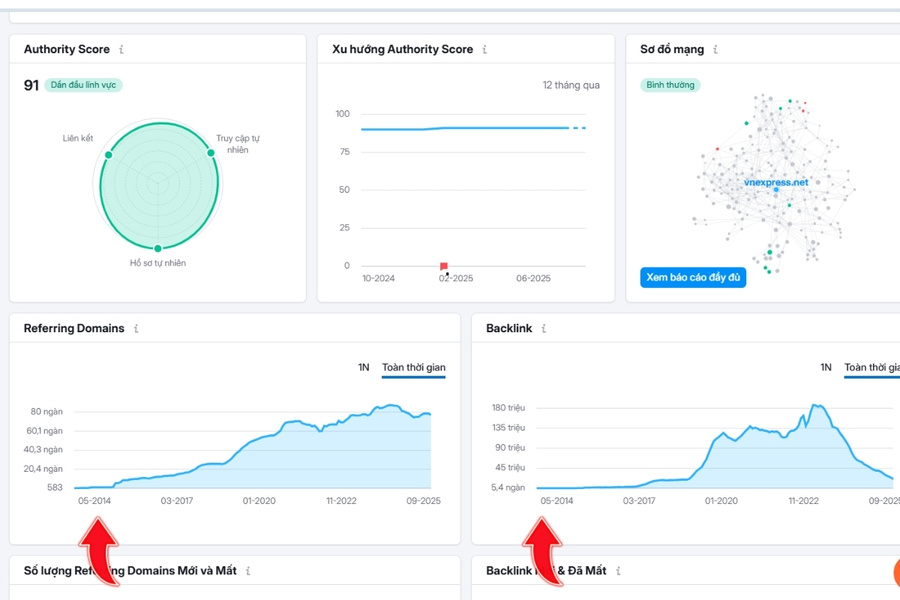
The date you see the first backlink appear will usually be sau The date the website starts to open the index is a short period of time. This is because it takes time for other websites to discover your content and decide to link to it. However, this is still a very valuable time indicator.
5. Check First Discovered Data in Google Search Console
This last method is a little special: it’s only for you if you are the owner or have the right to administer that website through Google Search Console. This is your way of viewing data directly from Google about your own website.
This tool doesn’t tell you the index date of the entire website, but it will indicate the first day Googlebot discovered a specific URL. By checking important URLs such as homepages or old articles, you can get a very good estimate.
To check, follow these steps:
- Step 1: Log in to your Google Search Console account.
- Step 2: In the left menu bar, in the Indexing (Indexing), select Trang (Pages).
- Step 3: In the list of indexed pages, click on a URL you want to check. This will open the tool Check URL (URL Inspection).
- Step 4: In the report that appears, open the section Explore the site (Discovery). Information flow First Detection (First discovered) is the day that Googlebot first found this URL.
Why didn’t Google publish the first index date?
This is a very good question that many SEOs also ask. According to Duan learn, there are two main reasons for this.
First, Google’s process of data collection and indexing is extremely complex. It doesn’t work in the “turn on the switch” fashion for an entire website, but rather a continuous process, where Googlebots discover and index each URL individually. So it’s impractical to determine a single date for the entire website.
Second, and also very important, is to prevent search result manipulation. If “age index” is a publicly available and easy to check indicator, many people can take advantage of it to trade old domain names just because of their age, instead of focusing on content quality. Failure to publish makes the SEO playground more fair.
💡 If you are working with satellite site systems, see more experience SEO hosting choose to build PBN with separate IP to avoid footprint.
Conclusion
In short, my experience is to check when the site starts to open index You shouldn’t rely on a single method to get the most out of your business. The combination of the Wayback Machine’s visualization, WHOIS domain registration date technical data, and in-depth analysis from tools like Ahrefs will give you the most reliable answer.
💡 Need to evaluate domain history or build an overall strategy, you can ask SEO services of Duan Digi.
